Log Useful Temperature and Humidity Readings With a DHT11
By admin
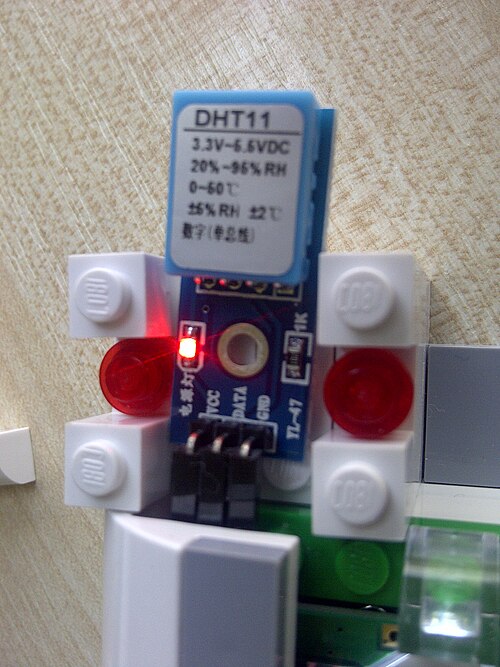
A DHT11 can make a simple indoor humidity and temperature display. It sends both readings over one data line and works with common Arduino and CircuitPython libraries. The sensor is best suited to observing broad changes in the room. Careful placement and consistent logging make those readings easier to interpret.
Identify your sensor board and its wiring
Check whether you have the four-pin bare sensor or a breakout board with a labelled header. Use that part’s pinout to identify supply, data and ground. Some breakout boards already include the data pull-up resistor. If your bare sensor needs one, use the value recommended by the sensor or library documentation, and pull up to a voltage acceptable to the controller’s input. Confirm the board’s supply range as well, particularly when connecting to a 3.3 V controller.
Keep the wiring short initially and share a ground between sensor and controller. Run a basic library example and choose DHT11 as the sensor type. Use a delay of at least two seconds between readings as a conservative starting point. Capturing data more often adds overhead without helping a sensor that updates slowly. Include both units in your own output and clearly label relative humidity as percent RH.
Handle missing and slow-changing data
Occasional checksum errors or timeouts can occur. Record a failed sample as missing, then retry at the next scheduled interval. If you display the last valid value, show its age so a reader can tell when the measurement has gone stale. Track the number of failed samples when debugging. Frequent errors justify reviewing the pull-up, wiring, supply and sampling interval.
Mount the sensor with air around its vent, away from a warm regulator, display backlight or a stream of air from a heater. Give it time to settle after moving the project. Log a small set of readings with timestamps and compare trends under stable room conditions before relying on alerts. If you need to set a threshold, stay within the documented operating range and allow margin for measurement error and slow response. For a demo display, an update every few seconds is convenient. A longer interval is often enough for tracking changes in a room.